Now Reading: Video editing course
-
01
Video editing course
Video editing course

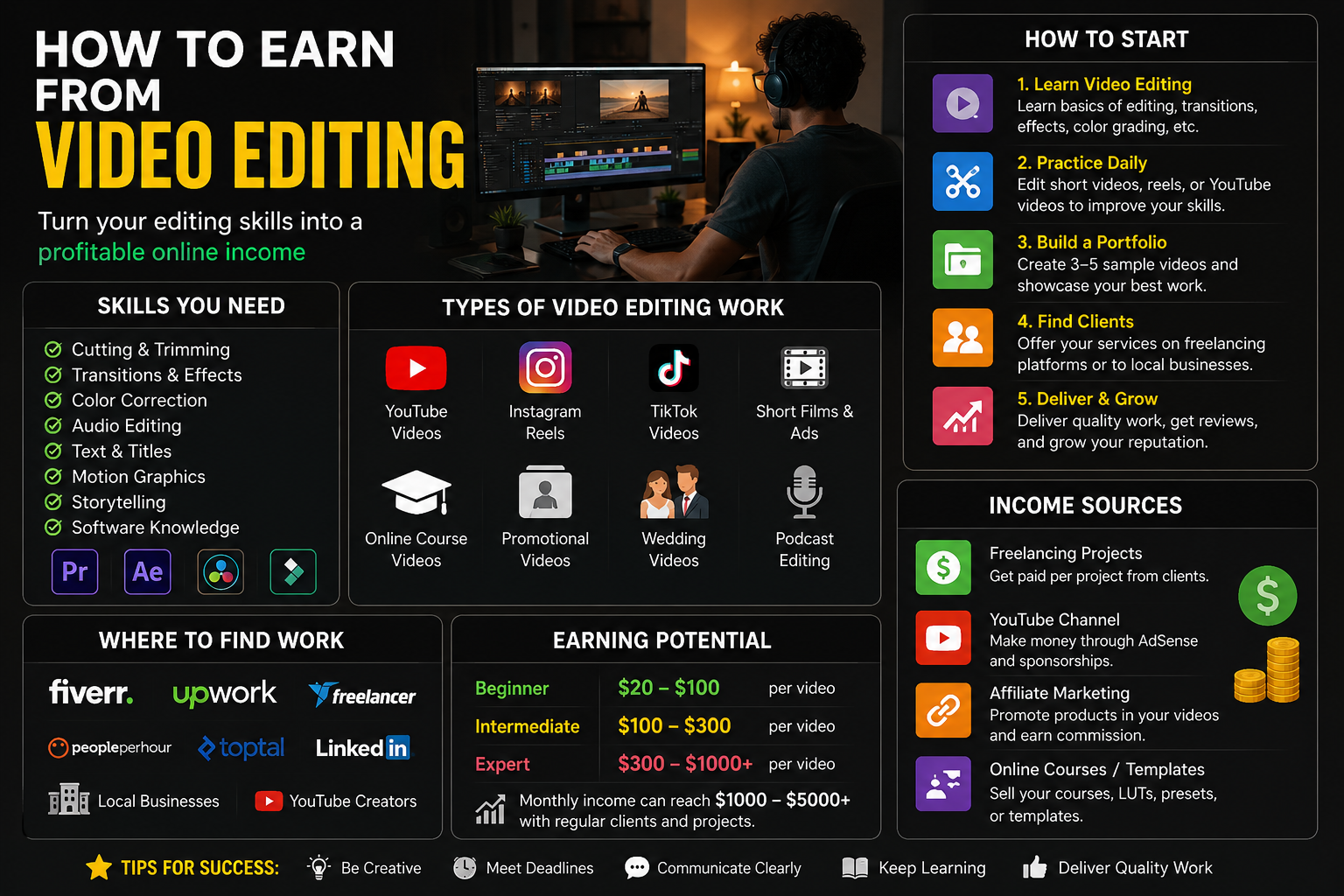
How to Actually Earn Money From Video Editing (Without Burning Out)
A real-world guide from someone who went from broke editor to booking $3,000+ months — and made every mistake along the way.
RK
Raza Khan
Tech Blogger & Freelance Editor · May 2026 · 14 min read
I still remember staring at my bank balance in January 2022, having spent six months learning Premiere Pro, buying a bunch of LUTs I didn’t need, and editing practice reels for “exposure.” My total income from video editing that month? Fourteen dollars — from a single Fiverr order I underpriced to the point of embarrassment.
If that sounds familiar, stick around. Because what I’m going to share isn’t a YouTube-ad fantasy about making $10,000 your first month. It’s what actually worked — the order I tried things in, what flopped, and what eventually turned video editing into a real income source I could count on.
Let’s get into it.
Why Video Editing Is Actually a Solid Skill to Monetize (If You’re Realistic)
The content economy isn’t slowing down. YouTube channels, Instagram Reels, corporate training videos, wedding films, podcast clips, course content — all of it needs editing. The businesses and creators producing this content don’t always have time to learn the craft themselves, and that gap is exactly where you fit in.
The honest reality is this: you don’t need to be a Hollywood-level editor. You need to be reliable, fast, and good enough for your target client. I spent way too long trying to perfect color grading when my early clients just needed clean cuts and decent audio sync. Know who you’re editing for, and get good at that first.
The real barrier isn’t skill — it’s positioning. Two editors with identical technical ability can earn wildly different amounts. The one who niches down, communicates well, and makes the client’s job easy will always out-earn the generalist who’s “open to anything.”
The Main Ways Editors Actually Make Money
Before diving into steps, here’s a quick picture of the actual income streams available — and rough what they pay at different experience levels.
🎬
Freelance Projects
$50–$500+
per video
📅
Retainer Clients
$500–$2,500
per month
🎓
Selling Courses
$200–$5,000
per launch
📦
Presets & Templates
$50–$800
passive/month
📹
Content Creation
$0–$3,000+
sponsorships + ads
🏢
Agency / Staff Job
$2,000–$6,000
per month
Most people start with freelance gigs and build from there. Some pivot into passive income with templates. A few go the YouTube-creator route and monetize their own channel. Let’s walk through how to actually do each of these — starting with the most accessible path.
Step-by-Step: Getting Your First Paying Clients
- 1Pick a niche — seriously, just pick one“I edit everything” is the kiss of death early on. Clients search for specialists. My first real breakthrough came when I stopped calling myself a “video editor” and started saying I was a “YouTube editor for fitness coaches.” Suddenly, my DMs actually had context. Popular niches that pay well right now: real estate walkthroughs, podcast clip editing, YouTube long-form for educators, wedding highlight reels, and short-form content for coaches and consultants.
- 2Build a portfolio of 3–5 strong samplesYou don’t need paying clients to make samples. Find free footage on sites like Pexels or Mixkit, edit a mock-wedding highlight, cut together a “YouTube episode” using stock footage, or reshoot and reedite something you already find online (don’t claim it’s client work — label it as a concept piece). The goal is showing competence, not proving you’ve had clients.
- 3Go where your clients already areThis is the part most people skip. Cold applications on Fiverr while waiting is not a strategy. Instead: join Facebook groups for your niche (fitness coaches, real estate agents, course creators), genuinely help people, and mention your skills when relevant. LinkedIn works well for corporate content clients. Instagram works if your niche is visual (wedding, travel, food). Reddit’s r/forhire and r/videography get overlooked but actually work.
- 4Set a price and hold it (mostly)Pricing is where everyone panics. A rough starter framework: simple talking-head YouTube videos ($75–$150 each), short-form clips cut from a longer video ($25–$60 per clip), real estate walk-throughs ($150–$300), wedding highlights ($400–$1,200). Do NOT charge by the hour early on — charge per deliverable. And once you quote, don’t fold immediately. Most clients test you to see if you’re confident in your work.
- 5Deliver well, then ask for a referralThe best marketing I ever did was just being reliable and sending a short “if you know anyone who needs editing, I’d love a referral” message after a happy client. Four of my best long-term clients came through referrals from a single wedding job I did for $350 early in my career.
“Your first goal isn’t to earn a lot. It’s to earn something, learn how to work with real clients, and build proof that you can deliver.”
The Tools That Are Actually Worth Your Money
Let me save you some cash here, because I definitely didn’t spend it wisely at the start.
For editing software, there are really three main options:
Adobe Premiere ProDaVinci ResolveFinal Cut ProCapCut (short-form)
DaVinci Resolve is free and honestly better than Premiere Pro for color work. If you’re on a Mac, Final Cut Pro is blazing fast and worth the one-time $300 fee. Premiere Pro is the industry standard for collaborative work, but it’s a subscription you might not need right away.
For finding clients and managing work, these platforms are worth knowing:
FiverrUpworkContraLinkedInMotion ArrayEnvato Elements
For file delivery and client collaboration, Frame.io is fantastic (Adobe now includes it with Creative Cloud). For invoicing, Wave is free and completely solid. Don’t overcomplicate the business side when you’re starting out.
The Retainer Model: Why It Changed Everything for Me
Project-by-project work is exhausting. Every month you’re starting from zero, chasing new clients, negotiating the same conversations. The real stability came when I started pitching retainer packages.
Here’s the pitch I used for YouTube creators: instead of paying me per video, you pay a flat monthly fee and I handle X videos per month, with a 48-hour turnaround. Clients loved the predictability. I loved the consistent income.
My first retainer was $600/month for a fitness YouTuber — four long-form videos. Not glamorous money, but it was $600 I could count on while I built other clients around it. Within six months, I had three retainers running simultaneously. That’s when things actually started to feel like a real business.
Retainer tip: Offer a small discount (10–15%) compared to your per-video rate to incentivize the commitment. The discount is worth it for the cash flow security and the fact that you’re not constantly selling.
Passive Income from Editing: Is It Real?
Yes, but it’s slower to build than people make it sound. There are two main routes here.
Selling Presets, LUTs, and Templates
Platforms like Motion Array, Envato Market, and even Gumroad let you sell editing assets — LUT packs, Premiere Pro templates, transitions, title animations. The upside: you make it once and sell it forever. The downside: it takes time to build traffic to your products, and the market is competitive. I sell a pack of 20 cinematic LUTs on Gumroad and make about $120–$200/month from it — nothing life-changing, but it’s genuinely passive now.
YouTube Channel About Editing
If you enjoy teaching, starting a YouTube channel around editing tutorials can build into real income through AdSense, affiliate links (your editing software has affiliate programs), and sponsorships from audio libraries, stock footage sites, and plugin companies. Channels like Jordy Vandeput (cinecom.net) or Justin Odisho built entire businesses this way. It takes 12–24 months to see meaningful returns, but the compounding effect is real.
Mistakes I Made (So You Don’t Have To)
❌ Underpricing to “get experience”
Charging $10 for a video doesn’t just hurt your wallet — it attracts the worst clients. The people who want something for nothing are the same ones who’ll ask for 14 revisions. Price for the client you want, not the one who’ll take anything.
❌ Taking every single job that came my way
I once said yes to editing a three-hour corporate webinar for $80 because I was desperate. It took 11 hours. I learned that “yes to everything” is how you build a low-rate hamster wheel, not a business. Start saying no to stuff that doesn’t fit your rate or niche.
❌ Waiting until my skills were “perfect” to start
I spent almost three months doing free practice edits before showing anyone my work. That was two months too long. The real feedback comes from actual clients and actual briefs. Ship early, learn fast.
❌ No contract, no deposit
A client ghosted me after I delivered a complete 10-minute video. Never got paid. Lesson learned the hard way: always use a simple contract (even one page), always take 50% upfront, and use tools like AND.CO or HelloSign to make it painless.
❌ Buying gear I didn’t need
A top-end laptop, extra monitors, a fancy desk setup — all before I had consistent income. Your editing setup matters, but a mid-range laptop with 16GB RAM and Resolve will serve most clients perfectly. Gear is a reward for income, not a prerequisite for it.
What a Realistic Month Can Look Like
To make this concrete — here’s a rough breakdown of how a mid-level freelance editor (around the 12–18 month mark) might build a $2,500–$3,500 month:
- →One retainer client (YouTube creator):$900/month for 6 videos
- →One retainer client (course creator):$650/month for module edits + short clips
- →Two one-off project clients:$400–$600 each (real estate walkthroughs or podcast video)
- →Passive (LUTs, templates, or affiliate links):$150–$300
That’s a $2,600–$3,450 month — working about 25–35 hours per week. Not a passive-income fantasy, but a real, sustainable creative income. And it grows from there if you want it to.
One Last Thing Before You Close This Tab
The editors I’ve seen succeed aren’t necessarily the most technically brilliant. They’re the ones who showed up consistently, treated clients like people (not invoices), and kept getting slightly better each month.
This industry rewards patience and reliability more than raw talent. If you’re willing to put in 6–12 months of real effort — building a niche, getting your first few clients, learning how to work with feedback without getting defensive — you can build something genuinely sustainable here.
Start with one niche. Edit three portfolio pieces this week. Reach out to five potential clients before the weekend. That’s the whole playbook, honestly.
The rest is just showing up long enough for it to compound.